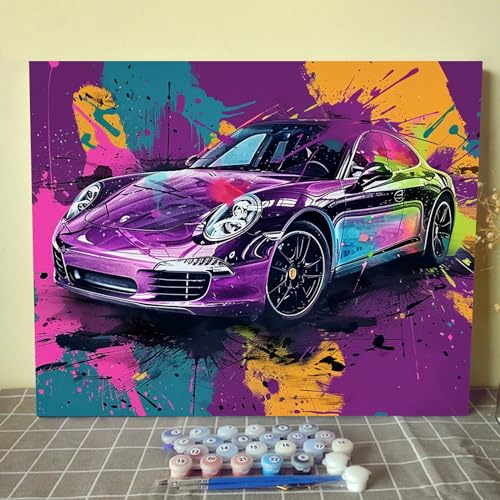
Have you ever stared at a stunning picture of a car and wished you could turn that passion into a unique piece of art? You have the vision, but the blank digital canvas feels intimidating. Creating professional-looking Digital Car Art can seem complex, leaving you unsure where to even begin.
To create digital car art, start by selecting a high-quality reference photo and outlining the car’s basic shapes in software like Adobe Photoshop or Procreate. Then, build layers for base colors, shadows, and highlights, paying close attention to metallic surface reflections. Finish by adding fine details and post-processing effects for a professional look. This process breaks down a complex task into manageable steps.
Leveraging tested frameworks and a proven design process, this guide will walk you through everything. You will discover seven stunning art styles, from hyper-realism to minimalist design. Get ready to transform your favorite cars into incredible digital masterpieces.
How Do You Create Stunning Digital Car Art That Turns Heads?
Creating captivating digital automotive art is a skill that blends technical ability with creative vision. It’s a form of digital illustration that focuses specifically on automotive subjects, requiring an understanding of form, light, and the unique characteristics of vehicle design. The process typically begins by choosing a subject, whether it’s a specific model like an exotic sports car or a general type like a classic muscle car. From there, artists use industry-standard tools like Adobe Photoshop for painting and photo manipulation or Adobe Illustrator for clean, scalable car vector art. The true magic happens in the details: accurately capturing the reflections on a metallic surface, ensuring correct proportions, and applying post-processing effects that make the final image pop. This guide provides a comprehensive look into both inspiring ideas and the practical, step-by-step methods used by a professional car artist to achieve professional results.
7 Stunning Digital Car Art Ideas To Master in 2026
Exploring different car art ideas is the best way to find a style that resonates with you and to develop your skills as a digital artist. Rather than just a gallery, this section serves as a practical launchpad. We will break down seven distinct and popular styles, from hyper-realistic car art that looks like a photograph to clean and modern minimalist car sketches. For each idea, you’ll get a mini-tutorial outlining exactly what tools you’ll need and the fundamental steps to create digital car art in that specific style. Whether you want to design a car poster with a vintage feel or a futuristic cyberpunk scene, you’ll find an actionable starting point right here.
1. Create a Hyper-Realistic 3D Automotive Render

Pin this incredible 3D art technique to your ‘Design Inspiration’ board!
What You Need
- 3D Modeling Software: A powerful program like Blender 3D (free) or Autodesk 3ds Max (paid) is essential.
- High-Resolution Blueprints: Accurate side, top, front, and back views of the chosen car for precise modeling.
- Powerful Computer: A PC with a dedicated graphics card is required for efficient 3D automotive rendering.
- PBR Textures: Physically Based Rendering textures for realistic materials like metallic paint, rubber, and glass.
Steps to Create
- Model the Base Mesh: Using your blueprints as a guide, model the car’s body, paying close attention to the topology of car models.
- Add Details: Model smaller components like wheels, lights, mirrors, and interior elements.
- UV Unwrapping: Create a 2D map of your 3D model (UV mapping for vehicles) to apply textures correctly.
- Texture and Shade: Apply your PBR materials and fine-tune shaders to replicate real-world surfaces.
- Set Up Lighting: Use an HDRI (High Dynamic Range Image) for realistic HDR lighting for car renders and reflections.
- Render the Scene: Render the final image at a high-resolution car art setting, a process that can take several hours.
Pro-Tip: For truly hyper-realistic car art, focus on ambient occlusion in car art and ray tracing in car renders. These settings create soft, realistic contact shadows and perfect reflections that sell the realism.

2. Design a Minimalist Vector Car Illustration

Save this clean design idea to your ‘Minimalist Art’ Pinterest board!
What You Need
- Vector Graphics Software: Adobe Illustrator is the industry standard for creating car vector art.
- High-Contrast Reference Photo: A clear side-profile shot of a car works best.
- Digital Art Tablet (Optional): A Wacom tablet can make drawing paths feel more natural, but a mouse is sufficient.
- Color Palette: A limited palette of 2-4 colors to maintain the minimalist aesthetic.
Steps to Create
- Import and Lock: Place your reference photo on a base layer in Illustrator and lock it.
- Trace with the Pen Tool: On a new layer, use the Pen Tool to trace the main silhouette and key body lines. Focus on creating smooth, clean curves. This step requires Bézier curve mastery.
- Refine Paths: Adjust anchor points and handles to perfect the curves and ensure all lines are clean and intentional.
- Apply Color: Use the Live Paint Bucket or create solid shapes to fill in the different sections of the car with your chosen color palette.
- Add Minimal Detail: Use simple shapes and lines to suggest details like wheels, windows, and lights without over-cluttering the design.
- Export: Save the final piece as an SVG or EPS file to maintain its scalable vector properties.
Pro-Tip: Pay close attention to line weight for car sketching. Use a thicker line for the main automotive silhouette design and thinner lines for interior details to create a clear visual hierarchy.

3. Illustrate a Retro & Vintage Style Car Poster

Add this retro vibe to your ‘Vintage Poster’ collection on Pinterest!
What You Need
- Digital Painting Software: Adobe Photoshop or Procreate are perfect for this style.
- Reference Photos: Images of classic car illustrations and vintage travel posters.
- Texture Overlays: Paper, grain, and halftone texture files to create an aged look.
- Retro Color Palette: A collection of muted, sun-faded colors (e.g., avocado green, harvest gold, faded orange).
Steps to Create
- Sketch the Composition: Start with a rough car sketch digital art layout, focusing on a dynamic angle for the car and a simple, scenic background.
- Block in Base Colors: Fill in the main shapes of the car and background with your retro color palette.
- Paint Light and Shadow: Use a textured digital brush to add shading. Keep it simpler and more graphic than a realistic painting.
- Refine Details: Add key details to the car, but avoid making them perfectly clean. Embrace slight imperfections.
- Apply Texture Overlays: In Photoshop, layer your paper and grain textures over the artwork. Use blending modes like ‘Multiply’ or ‘Overlay’ to integrate them.
- Add Halftone Effects: Use a halftone brush or filter to add a dotted pattern to certain color areas, mimicking old printing techniques.
Pro-Tip: For authentic retro car digital art, use post-processing for car art techniques. Add a Photo Filter adjustment layer in Photoshop to unify the colors with a warm or cool tint, and apply a subtle vignette to frame the piece.

4. Render a Dynamic Neon & Cyberpunk Car Scene

Pin this futuristic vision to your ‘Cyberpunk Art’ board!
What You Need
- Digital Painting/Editing Software: Adobe Photoshop is ideal for its powerful layer effects and lighting tools.
- Car Photo or Drawing: A base image of a car, preferably a sports or exotic model.
- Cityscape Photo: A nighttime photo of a city street to use as the background.
- Neon Brushes/Styles: Photoshop brushes or pre-made layer styles can speed up the process.
Steps to Create
- Prepare the Scene: Place your car image into the cityscape background. Adjust perspective and scale. Darken the car and the environment to create a night scene.
- Add Neon Lines: On a new layer, use a thin, hard brush to draw neon lines on the car’s body, underglow, or as background signs. Use vibrant colors like electric blue, pink, and purple.
- Create the Glow Effect: Duplicate the neon lines layer. Apply a Gaussian Blur to the bottom layer. Set the top layer’s blending mode to ‘Color Dodge’ or ‘Linear Dodge’ to create a bright, glowing core.
- Add Reflections: Create reflections of the neon lights on the wet ground and on the car’s glossy surfaces. Use a soft brush and lower the opacity for a realistic effect.
- Enhance the Atmosphere: Add elements like fog, rain, or steam using custom brushes or stock photos to build the cinematic car art mood.
- Color Grade: Use adjustment layers like ‘Color Balance’ and ‘Curves’ to unify the scene with a cool, cyberpunk-inspired color palette.
Pro-Tip: To make the neon lights look truly integrated, paint a soft glow of the same color on the surfaces right next to the neon tube. This simulates the light casting onto the car’s body and the ground.
5. Sketch a Classic Black and White Car Portrait

Save this timeless sketch to your ‘Car Drawing’ board for inspiration!
What You Need
- Digital Sketching App: Procreate on an iPad or Adobe Photoshop on a computer are excellent choices.
- Pencil & Charcoal Brushes: A set of realistic digital brushes that mimic different pencil hardnesses (HB, 2B, 6B) and charcoal.
- Stylus/Tablet: A pressure-sensitive stylus like the Apple Pencil or a Wacom tablet is crucial for this style.
- High-Contrast Reference: A photo with clear lighting and shadows to make shading easier.
Steps to Create
- Rough Outline: Start with a light “HB pencil” brush on a new layer to sketch the basic proportions and shapes of the car. Don’t worry about perfection.
- Create Clean Outlines: On a new layer above the rough sketch, refine your lines to create the final clean outlines. Vary your line weight to add depth.
- Block in Shadows: Use a soft “charcoal” or “6B pencil” brush on a new layer underneath the outlines to block in the darkest shadow areas.
- Mid-tone Shading: Build up the mid-tones using a “2B pencil” brush. Use cross-hatching or smooth shading techniques to show the car’s form. Pay attention to metallic surface reflection.
- Add Highlights: Use a digital eraser tool with a hard edge to “lift out” the brightest highlights on chrome and glass.
- Final Details & Texture: Add small details like grille patterns and tire treads. Add a paper texture layer on top to enhance the traditional feel.
Pro-Tip: Work on separate layers for outlines, shadows, and highlights. This allows you to adjust the intensity of each element non-destructively and makes it much easier to correct mistakes without starting over.

6. Compose an Abstract Automotive Art Piece

Pin this bold abstract idea to your ‘Modern Art’ board!
What You Need
- Image Editing Software: Adobe Photoshop with its vast array of filters and brushes is perfect for abstract art.
- Source Image: A high-resolution photo of a car, particularly one in motion.
- Custom Brushes: Splatter, grunge, or geometric brushes can add interesting textures.
- A Strong Concept: Decide what you want to convey: speed, power, elegance, etc.
Steps to Create
- Isolate Elements: Cut out interesting shapes from your car photo, such as a headlight, a spoiler, or a wheel arch.
- Distort and Abstract: Use Photoshop filters like ‘Motion Blur’, ‘Radial Blur’, ‘Wave’, or ‘Liquify’ on the isolated shapes to create a sense of movement and deconstruct the form.
- Build a Composition: Arrange your new abstract shapes on a blank canvas. Think about balance, flow, and creating a focal point.
- Introduce Color and Texture: Use bold, expressive colors that fit your concept. Paint with custom brushes or overlay textures to add depth and complexity.
- Unify the Piece: Use gradient maps or color balance adjustment layers to create a cohesive color story for the entire composition.
- Refine and Experiment: Abstract art is about experimentation. Don’t be afraid to try different filters, blending modes, and compositions until you create something you love.
Pro-Tip: Start by creating a simple background texture. Then, on a new layer, use the Motion Blur filter on a colorful shape to create a streak of light. This can act as the foundational element that suggests speed and directs the viewer’s eye.
7. Transform a Photo into a Stylized Car Portrait

Learn this amazing technique and pin it to your ‘Photoshop Tricks’ board!
What You Need
- Photo Editing Software: Adobe Photoshop is the best tool for this job.
- A High-Quality Photo: The better the starting photo, the better the final result.
- Digital Painting Brushes (Optional): To add manual brushstroke details.
- Filter Plugins (Optional): Plugins like the Topaz Labs suite can create advanced artistic effects.
Steps to Create
- Prepare the Photo: Open your photo in Photoshop. Duplicate the layer and convert it to a Smart Object. This allows you to apply filters non-destructively.
- Use the Camera Raw Filter: Go to
Filter > Camera Raw Filter. Here you can adjust exposure, contrast, clarity, and texture to enhance the photo’s base details. Boost the vibrance for a more artistic look. - Apply the Oil Paint Filter: Go to
Filter > Stylize > Oil Paint. Adjust the settings to create a painterly effect with visible brushstrokes. - Dodge and Burn: Create a new layer, fill it with 50% gray, and set the blending mode to ‘Overlay’. Use the Dodge tool to brighten highlights and the Burn tool to deepen shadows, adding artistic depth.
- Enhance the Colors: Use a ‘Selective Color’ or ‘Color Balance’ adjustment layer to fine-tune the colors and give the image a unique, stylized palette.
- Sharpen and Export: Add a final sharpening pass using the ‘Unsharp Mask’ filter and export your custom digital car art.
Pro-Tip: For a more convincing effect, after applying the Oil Paint filter, use the Smudge tool with a textured brush at a low strength to manually blend some edges. This mimics real brushwork and makes the result look less like a generic filter.

Key Takeaways: Your Quick Guide to Digital Car Art
Diving into digital automotive art offers a vast landscape of creative possibilities. To help you get started and reinforce the core concepts we’ve covered, here is a scannable summary of the most critical insights. These takeaways distill the key principles from the detailed tutorials above, providing a quick reference for your artistic journey.
- Style is Your Starting Point: Digital car art is incredibly diverse. Choose a style first—like hyper-realistic car art, minimalist car sketches, or retro car digital art—as it dictates your tools and techniques.
- Master the Right Software: Adobe Photoshop is the all-rounder for painterly styles and photo manipulation, while Adobe Illustrator is essential for clean, scalable car vector art.
- Layers Are Non-Negotiable: A professional workflow in any style relies on using layers for outlines, colors, shadows, and effects. This allows for non-destructive editing and easier revisions.
- Lighting Creates Realism: Whether you’re aiming for realism or a stylized look, understanding how light interacts with metallic surfaces is key. Focus on mastering reflections and highlights.
- Start with a Good Reference: A high-quality blueprint or photograph is the foundation of great car illustration. It ensures your proportions and details are accurate.
- Texture Sells the Effect: From the grain on a vintage car digital art poster to the reflections on a 3D car art render, texture is what elevates a good drawing to a great one.
People Also Ask About Digital Car Art
What software is best for digital car art?
For most artists, Adobe Photoshop is the best all-around software for digital car art due to its versatility in both sketching and painterly styles. If you need to create scalable graphics or clean lines, Adobe Illustrator is the industry standard for car vector art. For creating 3D car art, Blender is a powerful and free option.
How do I start drawing cars digitally for beginners?
Start by tracing over high-quality photos of cars to understand their proportions and shapes. Use a digital sketching app like Procreate or Photoshop with a simple pencil brush. Focus on getting the main outline correct first, then gradually add details like wheels and windows on separate layers before attempting to shade.
Can I make car art on an iPad?
Yes, the iPad is an excellent device for creating digital car art, especially with an Apple Pencil. Apps like Procreate are industry-leading for digital sketching and painting, offering a huge range of brushes and a user-friendly interface that is perfect for both beginners and professionals.
How do you get realistic lighting and reflections in car art?
To achieve realistic lighting, study how light reflects off real cars and use a soft-edged brush to paint highlights and a darker, saturated color for shadows. For reflections, you can subtly incorporate a distorted background image on a separate layer set to a low opacity over the car’s bodywork, paying attention to the car’s curves.
How do you turn a photo into digital car art?
Use Adobe Photoshop to transform a photo by first converting the image layer to a Smart Object for non-destructive editing. Then, apply filters like the ‘Oil Paint’ filter for a painterly look or the ‘Poster Edges’ filter for a more graphic style. Fine-tune the final piece using adjustment layers for color and contrast.
Where can I sell my digital car art?
You can sell digital car art prints and files on online marketplaces like Etsy, which is popular for custom and handmade goods. Other platforms like Fine Art America and Redbubble are excellent for selling prints on various products. You can also sell directly to clients by promoting your portfolio of car designs on social media like Instagram and Pinterest.
What is the difference between Photoshop and Illustrator for car art?
Photoshop is a raster-based editor that works with pixels, making it ideal for painting, sketching, and photo-realistic effects. Illustrator is a vector-based editor that uses mathematical equations to create lines and shapes, which means the artwork can be scaled to any size without losing quality, making it perfect for logos and clean illustrations.
How do you draw clean outlines digitally?
To draw clean outlines, use a vector program like Adobe Illustrator with the Pen Tool for maximum control and smooth curves. In a raster program like Photoshop or Procreate, use a stabilizer or streamline function on your brush. This smooths out jitters in your hand movements, resulting in sharp, confident lines.
What are popular digital car art styles?
Popular styles include hyper-realistic 3D renders, minimalist vector silhouettes, retro and vintage posters, and stylized custom car portraits. Niche styles like neon-drenched cyberpunk scenes and abstract automotive compositions are also gaining traction among car enthusiasts and art collectors.
Is AI-generated car art useful?
AI art generators like Midjourney can be a powerful tool for creating concepts and finding inspiration for digital car art. They can quickly generate unique ideas, compositions, and lighting scenarios. However, for professional, high-quality finished work, manual creation using tools like Photoshop or Blender is still preferred for its precision and control.
Final Thoughts on Your Digital Car Art Journey
You now have a complete roadmap to begin creating your own stunning digital car art. We’ve explored seven different styles, broken down the essential tools like Adobe Photoshop and Blender 3D, and outlined a proven design process for each. Remember that every complex automotive digital painting starts with a single line. The key is to choose a style that excites you, gather your references, and start experimenting with the techniques we’ve covered. With practice and a passion for automotive beauty, you have everything you need to turn your vision into incredible art.
Last update on 2026-04-19 / Affiliate links / Images from Amazon Product Advertising API