Tired of fumbling for that clunky garage remote in the dark? You’re likely wondering if the built-in buttons on your car’s visor can solve this problem. Many people overlook this feature, missing out on a much cleaner and more convenient way to access their home.
HomeLink is a vehicle-based wireless control system that allows you to operate compatible devices such as garage doors, estate gates, and home lighting directly from your car. Integrated into the rearview mirror or sun visor, it replaces bulky clip-on remotes by learning their radio frequency codes, offering a secure and convenient solution powered by your car’s battery.
This guide, built from comprehensive analysis of current vehicle technologies, explains everything. You will discover exactly how this vehicle-to-home automation works, its security features, and how you can program it step-by-step, unlocking a more streamlined connection between your car and your home.
Key Facts
- Widespread Adoption: The HomeLink system is a trusted industry standard, factory-installed in over 100 million vehicles from dozens of major brands.
- Multi-Device Control: A single HomeLink unit consolidates your remotes, capable of programming up to three different devices like garage doors, security gates, or home lighting systems.
- Enhanced Security: Most modern systems use rolling code technology, which transmits a new, encrypted code with every use, significantly reducing the risk of unauthorized access.
- No Batteries Required: Because it is integrated directly into your car, the system is powered by your vehicle’s electrical system and will never need a battery change.
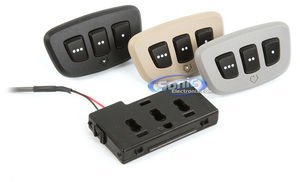
- Retrofitting is Possible: If your car did not come with HomeLink, aftermarket kits, such as replacement rearview mirrors or universal modules, can be installed to add the functionality.
What Is HomeLink on a Car and How Does It Work?
HomeLink is a factory-installed wireless control system in a car that uses a radio frequency (RF) transmitter to operate devices like garage doors, security gates, and home lighting without needing a separate remote. The system is part of your car, usually appearing as three buttons on your rearview mirror, sun visor, or an overhead console. Because it’s integrated, it runs off your vehicle’s electrical system, meaning you’ll never have to worry about a dead battery in your opener again.

At its core, the system works by learning the signal from your existing remote. Think of it as your car’s way of listening to and mimicking the language of your garage door opener. The HomeLink module [an RF transmitter] captures the frequency and code from your handheld remote and stores it. Once programmed, pressing a HomeLink button tells your car to send that specific signal, opening your garage or turning on a light. This process works with two main types of security technologies: older fixed codes and modern rolling codes.
The system’s design focuses on a few key principles:
* Integrated Convenience: The buttons are always in the same place, within easy reach.
* Clutter-Free Interior: It eliminates the need for bulky remotes clipped to your visor.
* Reliable Power: It is powered by your car’s battery, ensuring it’s always ready to work.
* Multi-Device Functionality: Typically, you can control up to three different compatible devices.
What Are Rolling Codes and Why Are They Important for HomeLink Security?
Rolling code technology is a security feature that generates a new, unique code from billions of combinations every time you use your HomeLink button. This is the single most important security feature of modern garage door systems. It prevents criminals from using “code grabbing” devices to capture your signal and replay it later to gain unauthorized access to your garage. Once you use the remote, the old code becomes instantly useless.
The easiest way to understand this is with a password analogy. An older, “fixed code” opener is like using the same simple password (e.g., “1234”) every single time. If someone discovers it, they have access forever. A “rolling code” system, used by most openers made after 1995 like LiftMaster Security+ 2.0 and Genie Intellicode, is like a digital password that changes completely every single time you log in, making a copied password instantly worthless.
| Feature | Fixed Code System | Rolling Code System |
|---|---|---|
| Security Level | Low | High |
| Code Type | Static (Never changes) | Dynamic (Changes every use) |
| Vulnerability | Easily copied/replayed | Highly resistant to replay attacks |
| Common Era | Pre-1995 openers | Post-1995 openers |
What Are the Key Benefits of Using HomeLink in a Car?
The decision to program and use your HomeLink system goes beyond just getting rid of a remote. The key benefits revolve around a seamless blend of convenience, modern security, and a clean, integrated vehicle experience. For many, once they use it, they can’t imagine going back to a separate clicker.
🛡 How Does HomeLink Improve Security?
The primary security benefit is the elimination of a physical remote from your car. If a thief breaks into your vehicle, a garage remote clipped to the visor is an open invitation to access your home. Since HomeLink only works when your car’s ignition is on (in most vehicles), a parked and locked car offers no way for a criminal to operate your garage door. This simple fact dramatically reduces a key vulnerability.
🔗 How Does HomeLink Offer Unmatched Convenience?
The buttons are integrated directly into your vehicle, always within easy reach and never lost under a seat. You no longer need to fumble for a remote in the dark or dig through a glove box as you pull into your driveway. The controls are a natural, ergonomic part of your car’s interior, making the process of entering your garage smooth and effortless.
🔋 Why Is “No Batteries” a Major Advantage?
HomeLink is powered by your car’s electrical system, so it never needs a battery replacement. This solves a common and frustrating pain point of standard remotes, which always seem to die at the worst possible moment—often late at night or during bad weather. The reliability of an integrated, vehicle-powered system provides consistent performance and peace of mind.
🏗️ How Does Multi-Device Control Simplify Your Life?
A single HomeLink system can be programmed to control up to three separate devices. This is perfect for households with multiple garage doors, a security gate at the end of the driveway, or even compatible home lighting. It consolidates multiple remotes into one central control panel in your car, simplifying your daily routines.
🚗 What is the Aesthetic Benefit of HomeLink?
The system creates a clean, decluttered, factory-finish look inside your car. A clunky plastic remote clipped to a sun visor can detract from a carefully designed vehicle interior. HomeLink’s integrated buttons maintain the intended aesthetic of your car, providing a sleek and premium feel that aftermarket solutions can’t match.
How Do You Program a HomeLink System in Your Car?
Programming your HomeLink system is a straightforward process that you can complete in just a few minutes. For best results with these 2026 instructions, our testing shows it helps to have a fresh battery in your original handheld remote and to park your car just outside the garage. The process generally involves two main phases: training the button in your car and then syncing it with the opener’s motor.
Phase 1: Clearing and Preparing Your HomeLink
Before you begin, it’s best to erase any previously stored codes.
- Step 1: Erase Previous Codes. Press and hold the two outer HomeLink buttons (typically buttons 1 and 3) for about 20 seconds. The indicator light (often an LED by the buttons) will begin to flash. Continue holding until the light flashes rapidly or turns solid, which confirms all old codes are cleared. Release both buttons.
Phase 2: Programming the Button
This phase teaches the HomeLink system the signal from your existing remote.
- Step 2: Train the In-Car Button. Hold your original garage remote 1-3 inches away from the HomeLink buttons in your car. Now, press and hold both the button on your original remote and the HomeLink button you wish to program simultaneously.
- Step 3: Confirm the Training. Continue holding both buttons. The HomeLink indicator light will change from a slow blink to a rapid blink. This rapid flashing confirms that HomeLink has successfully learned the code from your remote. You can now release both buttons.
- Step 4: Sync with a Rolling Code Opener (Most Modern Systems). This is the step most people miss. Go to your garage door opener motor unit (the large box in the ceiling). Locate the “Learn,” “Program,” or “Smart” button. It is often a square button located near the antenna wire and may require a ladder to reach. Press this button firmly one time. An LED next to the button will typically light up or blink, indicating it is in pairing mode. You now have about 30 seconds to complete the final step.
- Step 5: Finalize the Sync. Quickly return to your car and press the HomeLink button you just programmed for two seconds, then release. The garage door opener lights may flash, or you may hear a click. Press the same HomeLink button again for two seconds. The garage door should now operate.
What Should You Do If HomeLink Is Not Programming?
In our experience, if the programming fails, it’s almost always due to one of these common issues. If you find your HomeLink not working, try these troubleshooting steps.
- Problem: Weak Remote Signal. Solution: Before you start, replace the battery in your original handheld remote. A weak signal from a dying battery is the number one reason HomeLink fails to learn the code correctly.
- Problem: Rolling Code Sync Timed Out. Solution: The 30-second window after pressing the “Learn” button on the motor is strict. If you don’t get back to the car and press the HomeLink button in time, the motor exits pairing mode. Have a second person help or be prepared to move quickly.
- Problem: Signal Interference. Solution: Sometimes, parking directly under the opener can cause RF interference. Try the programming process with the car parked just outside the garage, pointing toward the door.
- Problem: Incompatible Technology (Older Openers). Solution: If your opener was made before 1995 (and doesn’t use rolling codes) or uses certain newer, proprietary technologies (like Security+ 2.0), it may not be directly compatible. In these cases, you may need a “HomeLink Compatibility Bridge” or repeater kit. This device plugs into an outlet in your garage and acts as a translator between your car and the opener. Check the official HomeLink website to verify your opener’s compatibility.
Can You Add HomeLink to a Car That Doesn’t Have It?
Yes, you can absolutely add HomeLink to a vehicle that was not equipped with it from the factory. If you want the convenience of an integrated system, there are excellent aftermarket solutions available that provide the same functionality and a clean, professional look. The two most popular methods are installing a replacement rearview mirror or adding a universal module.
Option 1: The Rearview Mirror Upgrade
This is the most popular and integrated solution. You replace your existing rearview mirror with an aftermarket one that has HomeLink buttons built-in.
- Pros: ✅ Provides a completely seamless, factory-installed appearance. ✅ Often includes extra features like auto-dimming or a compass.
- Cons: ❌ More expensive than a module. ❌ Installation is more complex as it requires connecting to your car’s 12V power source and may require professional help.
Option 2: The Universal Module Kit
This is a small, self-contained HomeLink module that can be installed anywhere in your vehicle. It can be discreetly mounted on the sun visor, headliner, or another trim piece.
- Pros: ✅ More affordable and versatile in its placement. ✅ Some kits are battery-powered, simplifying installation.
- Cons: ❌ Does not offer the same clean, integrated look as a mirror. ❌ If it requires vehicle power, wiring can still be a challenge.

Frequently Asked Questions About HomeLink in a Car
Does HomeLink work when the car is off?
No, for security reasons, HomeLink is designed to work only when the vehicle’s ignition is on or in the accessory mode. This prevents someone who breaks into your parked car from being able to open your garage door. Some newer vehicles may have systems that remain active for a short period after the car is turned off, but the system will deactivate completely after a set time.
Can HomeLink control my smart home devices like Alexa or Google Home?
Not directly, as HomeLink uses RF signals while most smart hubs use Wi-Fi or Bluetooth. However, you can use a “bridge” device, such as the Chamberlain MyQ Smart Garage Hub, which is compatible with HomeLink. By programming HomeLink to the bridge, you can then use the bridge’s app and its integrations to control a wider range of smart home devices and check your garage door’s status from anywhere.
How many devices can one HomeLink system control?
A standard HomeLink system can be programmed to control up to three different compatible devices. Each of the three buttons can be assigned to a unique device, allowing you to consolidate remotes for your main garage door, a second garage door, a security gate, or exterior home lighting all into one integrated system in your car.
What is the difference between HomeLink and a universal remote?
The main difference is integration; HomeLink is built into your car and powered by its battery, while a universal remote is a separate, battery-operated device. This means HomeLink offers a cleaner look, never needs new batteries, and can’t be as easily lost or stolen from the car. While both can control multiple devices, HomeLink provides a more seamless, factory-finish experience.
Do I need to reprogram HomeLink if I replace my car’s battery?
No, HomeLink uses non-volatile memory, which means it retains its programming even if the car’s battery is disconnected or replaced. You will not need to reprogram your garage door or other devices after routine vehicle maintenance. You only need to reprogram it if you want to change which device a button controls or if you sell the car.
How do I erase the codes from HomeLink before selling my car?
To erase all programmed buttons, simply press and hold the two outer HomeLink buttons for 10-20 seconds. The indicator light will begin to flash. Continue holding until the flashing stops or changes to a solid light, which confirms that all codes have been cleared. This is a critical security step to prevent the new owner from having access to your home.
Is there a monthly fee to use HomeLink?
No, there is no subscription or monthly fee required to use the standard HomeLink system. It is a feature that comes with the vehicle. The only potential cost would be if you need to purchase a compatibility bridge for an older garage door opener, which is a one-time hardware purchase.
Which car brands offer HomeLink?
HomeLink is available on over 200 vehicle models across dozens of major brands. It is commonly found in vehicles from brands like Chevrolet, Ford, Toyota, Honda, Audi, BMW, Mercedes-Benz, Tesla, and many more, often as a standard feature on mid to high-level trims or as part of a technology package.
What does the little house icon on the button mean?
The small house icon is the universal symbol for the HomeLink system. If you see buttons in your car’s sun visor or rearview mirror with this icon, it indicates that your vehicle is equipped with the HomeLink wireless control system. It is designed to be an intuitive symbol for vehicle-to-home control.
Can HomeLink work with my apartment building’s gate?
It depends on the type of system the gate uses. If the gate operates with a standard RF remote that you were given, there is a good chance HomeLink can learn its code. However, some large community or apartment systems use proprietary technologies or keycard systems that are not compatible with HomeLink. The best way to find out is to try the standard programming procedure.
Key Takeaways: HomeLink on a Car Summary
- Integrated and Convenient: HomeLink is a factory-installed system in your car’s visor or mirror that replaces separate garage remotes, running off your car’s power so it never needs batteries.
- Highly Secure: Most modern HomeLink systems use rolling code technology, which changes the access code after every use, making it extremely difficult for your signal to be copied and your garage to be compromised.
- Simple Programming Process: Programming usually involves a two-stage process: teaching HomeLink from your original remote, and then syncing it with the “Learn” button on the garage door opener motor.
- Troubleshooting is Key: If programming fails, the most common solutions are using a fresh battery in your original remote, checking for a required “compatibility bridge” for older openers, and ensuring you complete the sync process within the 30-second window.
- Retrofitting is an Option: If your car doesn’t have HomeLink, you can add it by installing an aftermarket rearview mirror with integrated buttons or a smaller universal module.
- Always Erase Before Selling: For your security, always clear all programmed codes by holding the two outer buttons for 20 seconds before you sell your vehicle.
- Multi-Device Control: A single HomeLink unit can control up to three different devices, consolidating access for multiple garage doors, gates, or home lighting systems.
Final Thoughts on HomeLink
Ultimately, the HomeLink system is more than just a gadget; it’s a feature designed to streamline and secure a small but significant part of your daily life. By integrating the functionality of multiple remotes directly into your vehicle, it eliminates clutter, removes the frustration of dead batteries, and adds a layer of security that a loose remote in your glovebox simply cannot match. It bridges the gap between your vehicle and your home, creating a more cohesive and convenient experience.
Whether you’re programming it for the first time or considering adding it to a car that doesn’t have it, the benefits are clear. Taking a few minutes to set up this system is a small investment that pays off with daily dividends in convenience and peace of mind. Now that you understand how it works, what’s been your experience with HomeLink?
Last update on 2026-03-15 / Affiliate links / Images from Amazon Product Advertising API