
Tired of that annoying buzz, hiss, or whine coming from your car radio? You’re not alone; car radio static is a common frustration that can ruin any drive. This unwanted noise makes it difficult to enjoy music or listen to your favorite station.
To fix car radio static, you must first diagnose the source by performing a series of tests. Start by checking if the noise occurs with the engine on and off. Next, unplug the radio antenna to see if the static persists. This systematic approach helps isolate whether the cause is external interference, the antenna system, or your car’s electrical wiring.
Based on an analysis of current automotive repair methodologies, this guide provides a professional diagnostic framework. It will walk you through a step-by-step process to systematically find and eliminate the source of the noise. You’ll discover exactly how to pinpoint the problem and apply the correct, lasting fix.
Key Facts
- Systematic Diagnosis is Crucial: The most effective way to fix car radio static is to first isolate the source of the noise, which analysis shows can be the antenna, electrical system, or the head unit itself.
- Alternator Whine is Common: A high-pitched whine that changes with engine RPM is a classic symptom of alternator interference, a widespread issue in many vehicles.
- Grounding is a Primary Culprit: Industry analysis reveals that a poor or corroded ground connection for the radio is one of the most frequent causes of humming and buzzing sounds.
- Antenna Integrity Matters: Research indicates that a loose, damaged, or corroded antenna is a leading cause of weak signals and static on all stations, demonstrating its importance for clear reception.
- Aftermarket Accessories Interfere: Data shows that low-quality aftermarket accessories, particularly USB chargers and LED lights, are a significant source of radio frequency interference (RFI) that causes static.
How Do You Systematically Diagnose and Fix Radio Static in a Car?
To fix car radio static, start by diagnosing the source. Turn the engine on and off; if static disappears with the engine off, the issue is electrical (like the alternator). Next, unplug the radio antenna; if static remains, the issue is internal wiring or grounding, not the radio signal itself. This systematic process quickly narrows down the potential causes. A methodical approach saves you time and money by ensuring you target the actual problem instead of guessing.

From years of working with automotive electrical systems, we’ve learned that a logical diagnostic flow is the key to success. Start with the simplest tests and move toward the more complex ones. Before you begin any work, especially involving wiring, it’s a best practice to review automotive electrical safety guidelines to prevent injury or damage.
Follow these steps to systematically find the source of the noise:
- Check with the Engine On and Off: Start your car and listen to the radio static. Now, turn the engine off but leave the radio on (in accessory mode).
- If the static disappears with the engine off, the problem is electrical interference from your engine’s components. The most likely culprits are the alternator or ignition system. You can proceed to the section on fixing electrical system static.
- If the static remains with the engine off, the problem is not related to engine noise. Proceed to the next step.
- Test Different Audio Sources: Switch your radio from an AM/FM station to an auxiliary input, Bluetooth, or CD player.
- If the static is gone on other sources, the issue is with your radio’s reception. This points directly to the antenna system (mast, base, or cable).
- If the static is present on all sources, the problem is likely in the wiring between the radio and the speakers, a faulty ground, or the head unit itself.
- Unplug the Antenna: Carefully pull the radio (head unit) from the dashboard and unplug the main antenna cable from the back.
- If the static disappears (even if you lose reception), it confirms that interference is being picked up by your antenna. This could be from external sources or a faulty antenna cable.
- If the static remains, the source of the noise is within the head unit, its power supply, or its grounding.
- Disconnect Aftermarket Accessories: Unplug all non-factory accessories, such as USB chargers, dash cams, and phone mounts. These devices are a common source of radio frequency interference. If the static stops, you have found your problem.
This diagnostic process acts as a flowchart. By following it, you can confidently identify whether your issue lies with the antenna system, the car’s electrical components, or the radio’s own wiring.
| Diagnostic Checklist | Static with Engine Off? | Static on Aux/Bluetooth? | Static with Antenna Unplugged? | Likely Cause |
|---|---|---|---|---|
| Scenario 1 | No | No | N/A | Electrical (Alternator/Ignition) |
| Scenario 2 | Yes | No | No | Antenna System / External Signal |
| Scenario 3 | Yes | Yes | Yes | Head Unit / Grounding / Wiring |
What Are the Most Common Causes of Car Radio Static?
The most common causes of car radio static are a poor ground connection for the stereo, electrical interference from the alternator or ignition system, a damaged or loose antenna, and noisy aftermarket accessories like USB chargers or LED lights. Understanding which type of noise you’re hearing can help you quickly identify the underlying cause. For example, that annoying whine that gets higher when you rev the engine? That’s your alternator talking.
- 📡 Antenna Issues: A car radio antenna [a device designed to capture radio waves] that is loose, corroded, broken, or has a damaged coaxial cable cannot deliver a clean signal to your head unit. This is often the cause of static that is present on all stations.
- ⚡ Bad Grounding: Your car’s radio needs a solid ground connection to the vehicle’s metal chassis to complete its electrical circuit. A loose, rusty, or improperly connected ground wire for the head unit introduces unwanted electrical hum and buzz into the audio system.
- ⚠️ Electrical Interference: Your car’s electrical system is a noisy environment. The alternator can produce a high-pitched whine that changes with engine RPM (alternator whine), and the ignition system can create a popping or ticking sound that corresponds to engine speed.
- 📱 Noisy Accessories: Many cheap, poorly shielded electronic devices emit significant radio frequency interference (RFI). When you plug a low-quality USB charger or phone cable into your car, this interference can be picked up by your radio’s antenna, resulting in immediate static.
How Do You Fix Static Caused by the Antenna System?
To fix car radio static from your antenna, follow these steps: 1. Inspect the Mast: Check for cracks or breaks and tighten it if loose. 2. Clean the Base: Unscrew the mast and clean any corrosion from the base and connection point. 3. Check the Head Unit Connection: Pull out the radio and confirm the thick antenna cable is firmly plugged in. If these steps fail, the antenna or its coaxial cable may need replacement.
If your diagnostic tests pointed to the antenna, this is the best place to start your repair. Real-world experience shows that these physical connections are often the point of failure.
Here is the step-by-step process to ensure your antenna system is in perfect working order:
- Inspect the Antenna Mast: Visually check the external antenna mast for any signs of damage, such as cracks, bends, or fraying. If it’s a screw-on type, make sure it is hand-tight. A loose antenna mast is a very common source of poor reception solution car.
- Clean the Antenna Base: Unscrew the mast from its base. Over time, water and debris can cause corrosion on the threads and contact point, which severely affects the signal. Use a small wire brush or a piece of sandpaper to gently clean both the threads on the mast and the contact point inside the base until they are shiny.
- Check the Coaxial Cable Connection: The car radio antenna [a signal reception device] connects to the head unit via a thick, shielded wire known as a coaxial cable. You may need to remove your car stereo from the dashboard to access the back. Ensure this cable is plugged in firmly. A loose connection here is a frequent culprit.
- Examine the Cable for Damage: While you have the radio out, inspect the visible portion of the antenna cable for any pinches, cuts, or sharp bends that could damage the internal wiring.
Pro Tip: When cleaning the antenna base, applying a small amount of dielectric grease to the threads before screwing the mast back on can help prevent future corrosion and ensure a solid connection.
If you complete these steps and the static persists, the antenna cable itself may be faulty or the antenna base’s ground connection to the car body may have failed. At this point, replacing the entire antenna assembly is often the most effective solution.
How Do You Eliminate Static from the Car’s Electrical System?
To eliminate electrical static, first check the radio’s ground wire. Ensure it is securely bolted to a clean, bare metal part of the car’s chassis. If you hear a whining noise that changes with engine RPM, the cause is likely the alternator, which can be fixed by installing an in-line power noise filter between the alternator and the battery.
Working with your car’s electrical system requires caution. Always disconnect the negative terminal of the car battery before working on electrical wiring to prevent short circuits and protect sensitive electronics. This is a critical automotive electrical safety step.
Fixing a Bad Ground Connection
A constant hum or buzz that doesn’t change with engine speed often points to a bad ground. The ground wire provides a return path for electrical current. If this path is weak, your audio system will pick up interference.
- Locate the Ground Wire: On most aftermarket stereos, the ground wire is black. It should be attached to a solid metal part of the vehicle’s frame behind the dashboard.
- Inspect the Connection: Check if the screw or bolt holding the wire is tight. Look for any rust, paint, or plastic under the connection terminal.
- Clean the Contact Point: Remove the screw and ground wire. Use sandpaper or a wire brush to scrape the contact point on the car’s chassis down to the bare, shiny metal.
- Secure the Connection: Re-attach the ground wire terminal, ensuring it makes solid contact with the bare metal. Tighten the screw or bolt firmly.
Suppressing Alternator Whine
A high-pitched whine that rises and falls with your engine’s speed is a classic sign of alternator whine radio. This noise is generated by the alternator [the electrical generator in your car] and leaks into your radio’s power supply.
- Confirm the Source: The sound is a dead giveaway. If the whine is only present when the engine is running and its pitch follows your acceleration, it is alternator whine.
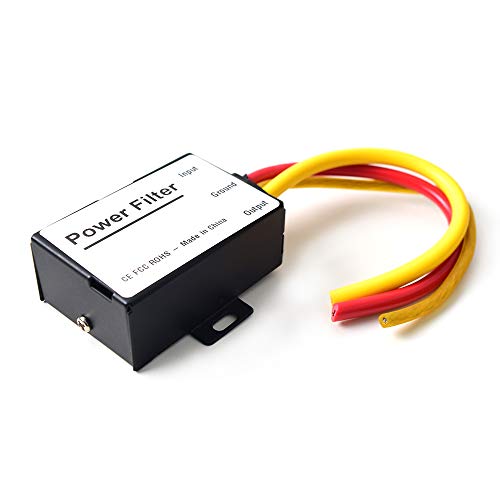
- Choose a Noise Filter: The most direct solution is an alternator noise suppressor, also known as a power line noise filter. This device installs on the 12V power wire that goes to your head unit.
- Install the Filter: With the battery disconnected, cut the main power wire to your radio. Connect the “input” side of the filter toward the battery and the “output” side toward the radio, following the manufacturer’s instructions. Secure the connections with crimp connectors or by soldering and using heat-shrink tubing.
- Test the System: Reconnect the battery and turn on your car and radio. The alternator whine should be gone.
How Do Ground Loop Isolators and Noise Filters Compare for Fixing Static?
Use a Ground Loop Isolator for humming/buzzing, especially with auxiliary devices. It plugs into RCA or aux cables to fix noise from differing ground potentials. Use a Power Noise Filter for a high-pitched whine that changes with engine speed. It connects to the power wire to clean up “dirty” power from the alternator.
Choosing the right device is critical; using the wrong one will not solve your problem. While both devices eliminate noise, they fix completely different types of electrical interference. The key is to match the device to the symptom you diagnosed earlier.
Here’s what our hands-on car radio static repair experience shows:
| Feature / Aspect | Ground Loop Isolator | Power Noise Filter |
|---|---|---|
| Problem Solved | Constant hum or buzz, often with aux cords (ground loop noise car audio) | High-pitched whine that changes with engine RPM (alternator whine radio) |
| How It Works | Breaks the “ground loop” in the audio signal path | Cleans electrical interference from the power supply line |
| Installation Location | On RCA cables between head unit and amp, or on an aux cord (audio cables) | On the 12V power wire going to the head unit or amplifier (power cables) |
| When to Use | Noise is present even when the engine is off, or appears when you plug in a phone. | Noise is only present when the engine is on and changes with acceleration. |
In short, a Ground Loop Isolator is for noise in your audio signal path. It’s common in systems with aftermarket amplifiers or when using an auxiliary cable with a device that’s also charging.
A Power Noise Filter is for noise in your power supply line. It is specifically designed to suppress the electrical interference generated by the alternator.
Expert Insight: While a ground loop isolator can be an effective fix, some professional installers consider it a band-aid for improper grounding. The best long-term solution for a ground loop is to ensure all audio components (head unit, amplifier, etc.) are grounded to the exact same point on the vehicle’s chassis.
FAQs About how to fix radio static in car
Why is my car radio static on all stations?
This usually points to a problem with your car’s audio system itself, not the radio broadcast. The most likely culprits are a bad ground connection, a faulty antenna or its cable, or widespread electrical interference from a component like the alternator. If the static is on all stations, start by checking the antenna connection at the back of the radio and the radio’s ground wire.
Can a bad battery cause radio static?
Yes, a weak or failing battery can cause radio static. The battery helps to smooth out the electrical supply in your car. If it’s not holding a proper charge, it can’t effectively filter voltage fluctuations from the alternator, allowing electrical “noise” to enter the audio system. This often sounds like a whine or hum that corresponds with engine speed.
How do I fix radio static when I accelerate?
Static that gets worse when you accelerate is almost always alternator whine. This high-pitched sound is caused by electrical noise from the alternator leaking into your audio system’s power supply. The most effective fix is to install a power line noise filter on the power wire leading to your car stereo.
Why does my car radio have static but the CD or Bluetooth works fine?
This is a clear sign that the problem is in your radio’s reception system. Since CDs and Bluetooth don’t use the antenna, the issue is isolated to the antenna itself, its cable, or the radio’s internal tuner. Your first step should be to inspect the antenna mast, its base, and the cable connection at the back of the head unit.
Can cheap USB chargers or LED lights cause radio static?
Absolutely. Many aftermarket electronic accessories, especially low-cost USB chargers and LED headlight/taillight bulbs, are poorly shielded and emit significant radio frequency interference (RFI). This RFI is picked up by your antenna and comes through as static. To test this, unplug all accessories and see if the static disappears. If it does, replace the offending device with a higher-quality, well-shielded version.
What is a ground loop and how do I fix it?
A ground loop occurs when audio components are grounded at different points on the car’s chassis, creating a slight voltage difference that results in a constant hum or buzz. It’s common in systems with aftermarket amplifiers. The best fix is to ground all audio components to the same clean metal point. If that’s not possible, a ground loop isolator installed on the RCA cables can be an effective solution.
Does separating power and audio cables really reduce static?
Yes, this is a critical best practice in car audio installation. Power cables carry a strong electrical current that creates a magnetic field. If audio signal cables (like RCAs) are run parallel to them, this field can induce noise into the signal. Always route power wires down one side of the vehicle and signal wires down the opposite side to prevent this interference. If they must cross, do so at a 90-degree angle.
My radio static only happens when it’s cold. What’s the cause?
This is often due to a loose connection or a cracked solder joint inside the radio or amplifier. When cold, metal contracts, which can pull a weak connection apart just enough to cause static. As the car’s interior warms up, the metal expands and re-establishes a solid connection, and the static disappears. This usually requires professional diagnosis and repair of the internal component.
How much does it cost to fix car radio static?
The cost can range from $0 to over $200. If the fix is simply tightening a loose antenna or cleaning a ground connection, it’s free. If you need to buy a part, a ground loop isolator or noise filter costs between $15 and $40. Replacing a broken antenna could be $20-$100 depending on the type. If the problem is internal to the head unit or requires professional diagnosis, labor costs could be $100-$200 or more.
Is it safe to do electrical work to fix radio static myself?
It can be, if you take proper precautions. For simple tasks like checking an antenna or installing a plug-in ground loop isolator, the risk is very low. However, when working with power wires, installing a noise filter, or re-doing ground connections, you must disconnect the negative terminal of your car battery first to prevent short circuits, electrical shocks, or damage to your car’s electronics. If you are not comfortable with this, consult a professional mechanic.
Key Takeaways: How to Fix Car Radio Static Summary
- Diagnose Before You Fix: Always start by identifying the source. If static changes with engine speed, it’s electrical (alternator whine). If it’s on all stations, check the antenna and ground (car radio ground).
- Check the Antenna System First: The most common and easiest fix is a loose, corroded, or damaged antenna. Inspect the mast, clean the base, and ensure the cable is secure in the back of the radio before moving to more complex issues.
- A Solid Ground is Crucial: A poor ground connection is a primary cause of humming and buzzing. Ensure your radio’s ground wire is bolted to a clean, paint-free spot on the car’s metal chassis.
- Match the Filter to the Noise: Don’t guess which filter to buy. Use a Power Noise Filter for high-pitched alternator whine and a Ground Loop Isolator for constant humming, especially from auxiliary sources.
- Isolate Your Wires: To prevent interference, always run power cables and audio signal cables (RCAs) on opposite sides of the vehicle. If they must cross, do so at a 90-degree angle.
- Beware of Cheap Accessories: Low-quality USB chargers, phone mounts with built-in electronics, and LED lights are major sources of radio frequency interference (RFI). Unplug them to see if your static disappears.
- Safety First with Electrical Work: Before cutting, splicing, or re-grounding any wires, always disconnect the negative terminal of your car battery to prevent electrical shorts and protect your vehicle’s sensitive electronics.
Final Thoughts on Fixing Car Radio Static
Resolving car radio static doesn’t have to be a frustrating guessing game. By approaching the problem with a systematic diagnostic process, you can move from being annoyed by the noise to being empowered to fix it. The key is to listen carefully to the type of static and observe when it happens. This information is your most valuable tool, pointing you directly toward the antenna system, the electrical components, or the ground connection.
Remember to start with the simplest checks first—the antenna mast and connections—before moving on to more involved tasks like cleaning ground points or installing filters. More often than not, the solution is straightforward and requires only a few minutes of your time. With the right knowledge and a methodical approach, you can restore clarity to your car’s audio system and get back to enjoying the drive.
Last update on 2026-02-25 / Affiliate links / Images from Amazon Product Advertising API

![Pennsylvania Car Dealer License Official Complete Guide [year]](https://i0.wp.com/carxplorer.com/wp-content/uploads/2026/02/Pennsylvania-Car-Dealer-License-Official-Complete-Guide-year-2.jpg?resize=60%2C60&ssl=1 "Pennsylvania Car Dealer License Official Complete Guide [year] 4")


