
Ever spent an afternoon under the hood, covered in grease, only to discover the brand-new part in your hand is just a millimeter off? This guide is here to make sure that never happens again. We’re going to demystify the process of how to check compatibility of car parts, saving you from the frustration of returns, wasted time, and the dreaded second trip to the auto parts store.
To check car part compatibility, you must first identify your vehicle’s 17-digit VIN. Then, use this information in online interchange databases for used parts or on major retailers’ “Vehicle Picker” tools for new parts. For ultimate accuracy, cross-reference the original part’s OEM number.
Leveraging extensive analysis of established automotive databases and repair methodologies, this guide unpacks the exact, proven steps professionals use to guarantee fitment. We will walk through everything from decoding your car’s unique identity to using powerful free online tools and understanding the secret language of part numbers. By the end, you’ll have a complete blueprint for finding the right part, the first time, every time.
Key Facts
- VIN is Supreme: Using the 17-digit Vehicle Identification Number (VIN) is the single most accurate method to identify your vehicle’s exact specifications, as it eliminates errors caused by mid-year manufacturing changes that year/make/model lookups can miss.
- Interchange Unlocks Value: Free parts interchange databases, like car-part.com, reveal that manufacturers often use the same component across many different models and even brands (e.g., Ford and Lincoln), significantly expanding your options for sourcing used parts.
- Retailer Tools Guarantee Fit: Major online auto parts retailers like AutoZone and RockAuto have “Vehicle Picker” tools that filter search results to show only parts confirmed to fit your specific vehicle, often backing it with a fitment guarantee.
- OEM Numbers Eliminate Guesswork: The Original Equipment Manufacturer (OEM) part number is a unique identifier for a component. Cross-referencing this number is the gold standard for finding an exact match or a compatible aftermarket alternative.
- Fitment Data Drives Sales: For eBay sellers, creating a detailed vehicle compatibility list (fitment guide) in a listing is critical. It directly increases buyer confidence, boosts listing visibility in search, and significantly reduces the rate of costly returns.
Why Checking Car Part Compatibility is Non-Negotiable
Checking car part compatibility is crucial to save money, avoid project delays, and ensure your vehicle’s safety and performance by preventing incorrect purchases. Think of it as the “measure twice, cut once” rule for auto repair. An incompatible part isn’t just an inconvenience; it can lead to a cascade of problems ranging from wasted money to serious safety hazards. Ever spent an afternoon trying to fit a part that was just a millimeter off? We’re here to make sure that never happens again.
This process involves verifying that a replacement part will not only physically fit but also function correctly within your vehicle’s complex systems. The components you’ll be looking for generally fall into two categories. OEM (Original Equipment Manufacturer) parts are made by the same company that built them for your vehicle at the factory. Aftermarket parts are made by different companies and are designed to function as replacements, often with variations in design or materials. Understanding how to check compatibility of car parts is essential for both.
Here’s the mechanic’s wisdom on why this step is absolutely critical:
- 💰 Cost Savings: Buying the wrong part means you’ve spent money on something you can’t use. Factoring in potential restocking fees and the cost of return shipping, a simple mistake can become surprisingly expensive. Getting it right the first time is the most budget-friendly approach.
- ⏰ Time Saved: Your time is valuable. A repair project that should take an hour can turn into a multi-day ordeal when you have to stop, return the wrong part, and wait for the right one to arrive. Proper compatibility checks keep your project on schedule.
- 🛠 Safety & Performance: Modern vehicles are intricate systems where components work in harmony. An incorrect sensor, a slightly different brake caliper, or an alternator with the wrong output can degrade performance, trigger warning lights, or, in the worst-case scenario, lead to a critical failure on the road.
- 😡 Avoiding Frustration: There are few things more demoralizing in a DIY project than realizing your hard work has been stalled by a preventable error. Verifying fitment beforehand eliminates this major source of stress and keeps your repair experience positive and productive.
Step 1: Gather Your Vehicle’s Exact Specifications (The Source of Truth)
To begin, locate your vehicle’s 17-digit VIN on the dashboard or driver’s side door jamb. This number is essential for accurately identifying your car’s year, make, model, and engine for any parts lookup. Before you even open a new tab to search for parts, you must become an expert on one thing: your own vehicle. Simply knowing you have a “Ford F-150” isn’t enough. Is it a Lariat or an XLT? Does it have the 5.0L V8 or the 3.5L EcoBoost? These details make all the difference, and the Vehicle Identification Number (VIN) is the gold standard for getting them right.

The VIN is a unique 17-character code that contains a wealth of information, including the precise model, engine type, transmission, and even the plant where it was assembled. It eliminates all the ambiguity that can arise from mid-year production changes or optional packages. Learning how to check compatibility of car parts by vin is the first and most important skill.
Here is the exact process to follow:
- Locate Your VIN: The VIN is typically found in a few standard locations. Check the small metal plate on the driver’s side of the dashboard, visible through the windshield. It’s also commonly found on a sticker in the driver’s side door jamb. Other places can include your vehicle’s title, registration, or insurance documents.
2. Note Down Key Details: While the full VIN is best, you should at a minimum have the following information ready for any search:
* Year
* Make (e.g., Toyota)
* Model (e.g., Camry)
* Trim or Submodel (e.g., LE, XSE)
* Engine Size (e.g., 2.5L 4-Cylinder, 3.5L V6)
Pro Tip: Take a picture of your VIN plate with your phone. It’s the single most valuable piece of information for any repair or part search, ensuring you always have the source of truth at your fingertips.
Step 2: Use Online Tools for a Free Parts Interchange Lookup
Utilize free online databases like car-part.com or Pull-A-Part’s interchange tool. Enter your vehicle’s details and the desired part to see a list of other makes and models that use the exact same component. This is where you can find some of the best deals, especially on used parts. A free parts interchange lookup is a powerful tool that taps into vast databases to show you which other vehicles used the exact same part as yours.
Quick Fact: ‘Interchange’ happens because manufacturers often use the same part across multiple models and even different brands to save costs. Your Ford part might be identical to one in a Mazda! These databases are particularly useful for sourcing components from salvage yards, saving you a significant amount of money compared to buying new. Based on SERP data analysis, one of the most trusted resources is car-part.com.
Here’s a simple guide on how to check compatibility of car parts using a tool like car-part.com:
- Select Your Vehicle: Navigate to the website and begin by entering your vehicle’s Year, Make, and Model from the dropdown menus. Precision here is key.
- Select the Part: You’ll be presented with a list of part categories. Choose the specific part you need, for example, “Alternator” or “Mirror, Door.”
- Provide Additional Details: The system may ask for more information, such as your location (to find nearby suppliers) or specifics about the part (e.g., “Left” or “Right” side).
- View Interchange Information: After you search, the results page will show a list of available parts. Critically, it will often have a column or note indicating “Interchange.” This tells you the other makes, models, and years that this exact part will fit, vastly expanding your search.
Using a free auto parts interchange database is an essential skill for any DIY mechanic. It turns a narrow search for a “2015 Honda Accord alternator” into a much broader search that might include alternators from other Honda and Acura models, giving you more options and a better chance of finding a great deal.
Step 3: Check Compatibility on Major Auto Parts Retailers’ Websites
On retailer websites like AutoZone or RockAuto, use the “Vehicle Picker” tool. Add your car’s specific year, make, and model to your account, and the site will automatically filter search results to show only parts confirmed to fit. When you’re buying new OEM or aftermarket parts, the websites of major retailers are your best friend. They have invested heavily in creating sophisticated systems to ensure you get the right part. The most common and effective of these is the “Vehicle Picker” or “Add a Vehicle” feature.
This tool is the cornerstone of any car parts compatibility check online. It allows you to create a virtual profile for your vehicle. Once your car’s details are saved, the website’s entire catalog is filtered, hiding parts that won’t fit and only showing you the ones that will. This method is used by all major players, including AutoZone, O’Reilly, RockAuto, and TascaParts.com.
The process is straightforward and nearly identical across all major retail sites:
- Navigate to the Retailer’s Website: Choose your preferred online parts store.
- Locate the ‘Add a Vehicle’ Tool: This is almost always prominently displayed at the top of the homepage. It might be labeled “Find Parts for Your Vehicle,” “Select Your Vehicle,” or simply “Add a Vehicle.”
- Enter Your Car’s Details: Systematically enter the Year, Make, Model, and Engine/Trim information you gathered in Step 1. Some advanced tools may even let you input your VIN for maximum accuracy.
- Search for Your Part: With your vehicle now “active” on the site, use the search bar or navigate through categories to find the part you need. The website will do the heavy lifting, and every result you see should be a confirmed fit for your car.
Pro Tip: Create an account and save your car to your ‘garage’ on these sites. It saves immense time on future searches, and some retailers will even send you deals specific to your model. This simple action transforms the site from a generic catalog into a customized parts store for your specific vehicle.
Step 4: Advanced Method – Using OEM Part Numbers for Cross-Reference
For maximum accuracy, find the OEM (Original Equipment Manufacturer) number on your old part or from a dealer. Search this number online or in a cross-reference tool to find exact replacements and compatible aftermarket alternatives. This is the method the pros use to eliminate every last bit of doubt. Think of the OEM number as your part’s unique Social Security Number. It is a specific code assigned by the manufacturer that identifies that exact component, down to the smallest revision. If you can match this number, you have a 100% guaranteed fit.
An auto parts interchange cross-reference search tool works by taking this OEM number and mapping it to equivalent part numbers from other brands, including both the original manufacturer and various aftermarket companies. This is the most precise way of finding a compatible part.
Here’s how to execute this advanced technique:
- Find the OEM Number: This is the most challenging step. You have a few options:
- On the Old Part: The number is often stamped, engraved, or printed on a sticker directly on the part you are replacing. Clean it off and look carefully.
- Call a Dealership: The parts department at your vehicle’s dealership can look up the exact OEM number for you if you provide them with your VIN.
- Online OEM Diagrams: Many websites provide access to the official parts diagrams used by manufacturers. By navigating these diagrams, you can find your part and its associated number.
- Use the OEM Number in a Search Engine: The simplest first step is to type the OEM number directly into a search engine like Google. This will often bring up listings from various retailers for the exact part and its aftermarket equivalents.
- Use it on Retailer Sites: Most major retailer websites allow you to search directly by part number. Entering the OEM number in their search bar will often show you the direct OEM replacement and all compatible aftermarket options they carry.
- Use a Dedicated Cross-Reference Tool: Several specialized websites are designed specifically as an interchange cross-reference search tool. You enter the OEM number, and it generates a list of corresponding part numbers from dozens of different brands.

While this method requires more initial effort, it pays off in absolute certainty. It’s the ultimate way to perform a how to check compatibility of car parts check.
Special Focus: Creating Vehicle Compatibility Lists for eBay Sellers
eBay sellers should use a parts interchange database to compile a complete list of all compatible vehicles. Then, in the eBay listing tool, manually add this information to the “compatibility section” to maximize visibility and buyer confidence. For those who sell auto parts online, particularly on eBay, a vehicle compatibility fitment guide for ebay sellers is not just helpful—it’s essential for business. eBay’s platform has a specific feature that allows sellers to add a detailed “fitment list” to their listings. When used correctly, this feature dramatically improves your listing’s performance.
A comprehensive fitment list helps buyers find your part when they search for their specific vehicle, even if your title doesn’t mention it. More importantly, it gives them the confidence to purchase, knowing the part is confirmed to fit. This directly leads to more sales and, crucially, fewer returns from customers who bought the wrong item.
Here is the professional workflow for creating a perfect eBay compatibility list:
- Build Your Master List: Use the free parts interchange lookup tools from Step 2 (like car-part.com) to research your part. Create a complete and exhaustive list of every single Year, Make, and Model that your part is compatible with.
- Navigate to the Compatibility Section: When creating or editing your eBay listing, find the “Vehicle compatibility” or “Fitment” section. It’s a powerful part of the listing tool.
- Enter Each Compatible Vehicle: Manually enter or select each vehicle from your master research list. This can be time-consuming for parts with broad interchangeability, but it is absolutely worth the effort. Be meticulous.
- Double-Check for Accuracy: Before you publish the listing, review your compatibility table carefully. An error here can lead to a costly return and negative feedback. Accuracy is your best policy.
By taking the time to confirm your compatible vehicles ebay, you are providing immense value to your customers. This professional approach sets your listings apart, builds trust, and ultimately protects your bottom line by minimizing incorrect orders.
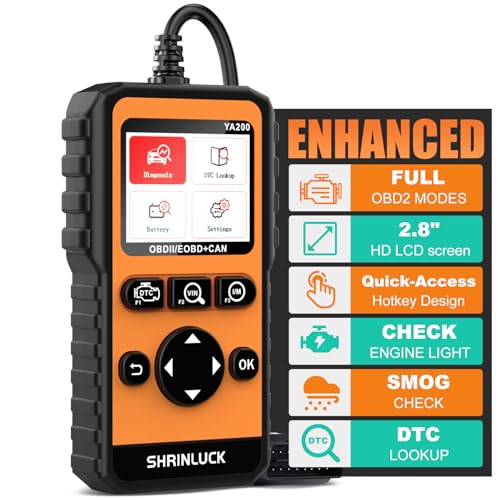
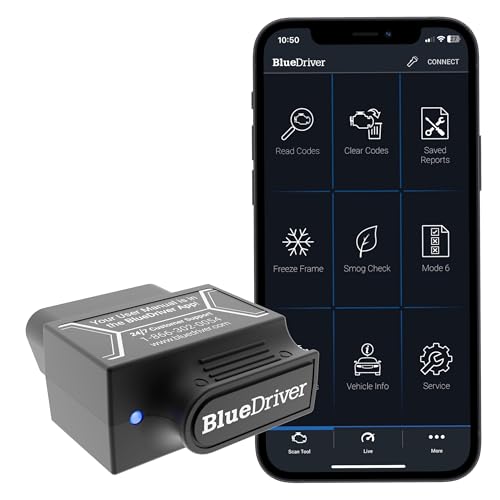
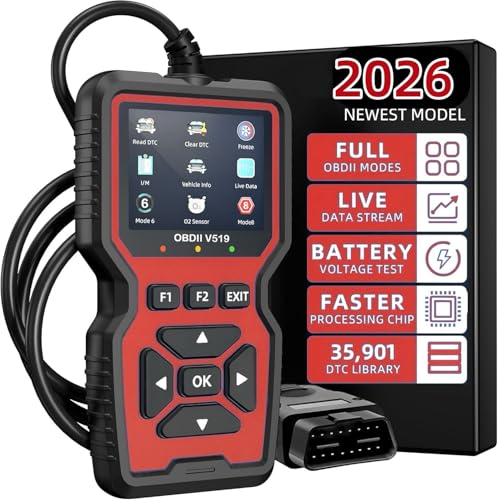
To ensure you have all the necessary information at your fingertips, investing in a good diagnostic tool can be invaluable. A quality OBD2 scanner can often pull your vehicle’s VIN directly, saving you time and preventing transcription errors.



FAQs About Checking Car Part Compatibility
We’ve covered the main methods, but a few common questions always pop up. Here are definitive answers to the most frequently asked questions about how to check compatibility of car parts.
How do I find car parts that fit my car for sure?
For guaranteed fitment, use your car’s VIN to find the specific OEM part number. Buying a part that matches this number is the most reliable method. While retailer “Vehicle Picker” tools are very accurate, they can occasionally have errors in their databases. The OEM number, however, is the direct identifier from the manufacturer. It accounts for even the smallest mid-year production changes that a simple year/make/model search might miss.
To guarantee a fit:
* ✅ Start with your full 17-digit VIN.
* ✅ Use the VIN to acquire the exact OEM part number from a dealer or online diagram.
* ✅ Purchase a part that explicitly matches or cross-references that specific OEM number.
Which cars share the same parts?
Cars often share parts when built on the same platform (e.g., Toyota and Lexus, Ford and Lincoln). The best way to find specific shared parts for your vehicle is by using a parts interchange database. This practice, known as “platform sharing,” is a common cost-saving measure in the automotive industry. A manufacturer will design a single underlying chassis and set of core components (like engines, transmissions, and suspension parts) and then use it to build several different models, sometimes even across different brands they own.
Common examples include:
* Toyota / Lexus: A Toyota Camry often shares many parts with a Lexus ES.
* Ford / Lincoln: The Ford F-150 shares its platform with the Lincoln Navigator.
* Volkswagen / Audi: Many VW and Audi models are built on the same architecture.
The only way to know for sure which specific parts are shared is to use a parts interchange lookup free tool as described in Step 2.
Is there an app for interchangeable car parts?
While dedicated interchange apps are rare, the mobile apps from major retailers (like RockAuto) and the mobile versions of interchange websites (like car-part.com) are the most effective tools for checking part compatibility on your phone. There isn’t one dominant, standalone “interchange app” that covers all vehicles. However, the functionality is readily available through mobile-friendly websites and the official apps of large parts retailers.
For on-the-go checks, your best options are:
* The mobile apps for retailers like AutoZone, O’Reilly, and RockAuto.
* The mobile-optimized websites for interchange databases.
Using a phone’s browser for these sites often provides a better experience than a dedicated but limited app. The primary advantage of a mobile app is the ability to save your vehicle in your “garage” for quick lookups.
Can I check compatibility for a specific brand like Toyota?
Yes, you can check compatibility for Toyota parts using the same methods. Select “Toyota” and your specific model in any interchange database or retailer’s vehicle picker tool to see all compatible parts. The entire process outlined in this guide is universally applicable to any brand, including Toyota. Whether you’re using a free parts interchange lookup or a retailer’s website, you will always start by selecting the make of your vehicle.
For those looking into how to check compatibility of car parts toyota, a useful tip is to also consider interchangeability with Lexus and, for older models, Scion parts. Since these are all brands under the Toyota corporate umbrella, they frequently share components, and interchange tools are particularly effective at identifying these cross-brand compatibilities.
Final Summary: Your Blueprint for Finding the Right Part, Every Time
Navigating the world of auto parts doesn’t have to be a game of chance. By adopting a systematic approach, you can move forward with the confidence of a seasoned mechanic. The entire process of how to check compatibility of car parts boils down to a clear, repeatable workflow that eliminates guesswork and ensures success. You now have the knowledge to find the exact component you need, whether it’s a common maintenance item or a hard-to-find piece for a classic project.
Here are the key takeaways to remember:
- 🔑 Always start with your VIN. It is the undisputed source of truth for your vehicle’s identity.
- 🔎 Use interchange databases for used parts. They are your best resource for expanding your options and finding incredible deals.
- 🛒 Use retailer “Vehicle Pickers” for new parts. Let their powerful, curated catalogs do the hard work of filtering for you.
- ❓ When in doubt, match the OEM number. It is the ultimate guarantee of a perfect fit.
Armed with this knowledge, you’re ready to find the right part confidently. What’s the first project you’ll be tackling?
Last update on 2026-02-19 / Affiliate links / Images from Amazon Product Advertising API


