
Tired of your outdated car stereo? You’re in the right place to modernize your ride. If you’ve been looking at newer cars with envy, wishing your trusted vehicle had modern navigation, music streaming, and hands-free communication, this guide will show you exactly how to add CarPlay to any car. We’ll break down the proven methods that bring today’s best in-car tech to the vehicle you already own.
Yes, you can add Apple CarPlay to virtually any car using one of three main methods: replacing the factory stereo with an aftermarket head unit, adding a wireless CarPlay adapter if you already have a wired system, or using a portable standalone display.
Leveraging extensive analysis of available upgrade paths and installation patterns, this guide unpacks the most effective approaches and critical insights you need. We will explore the pros and cons of each method, walk through the installation process for the most popular option, clarify the costs involved, and answer your most pressing questions. Get ready to transform your driving experience.
Key Facts
- Head Unit Replacement is the Gold Standard: The most common and integrated method for adding CarPlay to an older vehicle is by installing an aftermarket head unit from a reputable brand.
- Major Brands Dominate the Market: Aftermarket head units from manufacturers like Pioneer, Kenwood, Sony, Alpine, and JVC are widely available and offer reliable CarPlay integration.
- Compatibility is Not Guaranteed: Using an online compatibility tool, like the one offered by Crutchfield, is a critical first step to ensure you purchase a head unit and the correct installation accessories that fit your specific vehicle.
- Wireless Adapters Offer Simplicity: For cars made in recent years that already have a wired CarPlay system, a simple plug-in wireless adapter is the easiest and most affordable way to add wireless functionality.
- Professional Installation Has a Cost: While a DIY installation can save money, professional installation for a new head unit typically adds a significant cost, a factor that should be included in your total upgrade budget.
Yes, You Can Add Apple CarPlay to (Almost) Any Car: Here’s How
Absolutely! You can add the modern convenience of Apple CarPlay to an older car, even if it wasn’t an option from the factory. The days of being stuck with a basic radio or a clunky, outdated infotainment system are over. The key is understanding the three primary upgrade paths available to you, each suited for different needs, budgets, and technical comfort levels. Knowing how to add CarPlay to any car is simpler than you might think.

This upgrade is one of the most significant improvements you can make to an older vehicle, enhancing safety with hands-free controls and bringing all your essential iPhone apps right to your dashboard. Here are the main ways to achieve this:
- Install an Aftermarket Head Unit: This is the most popular and integrated solution. You replace your car’s entire factory stereo (the “head unit”) with a new one that has a touchscreen and built-in Apple CarPlay.
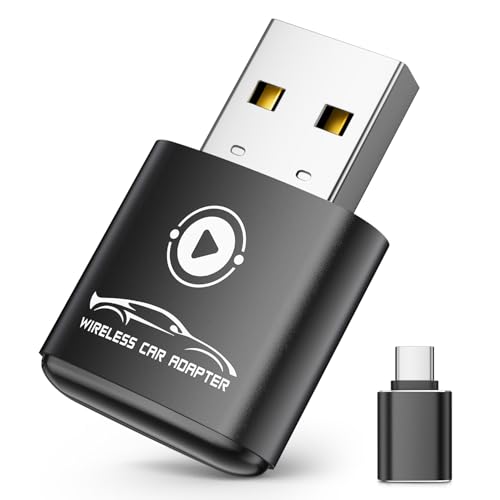
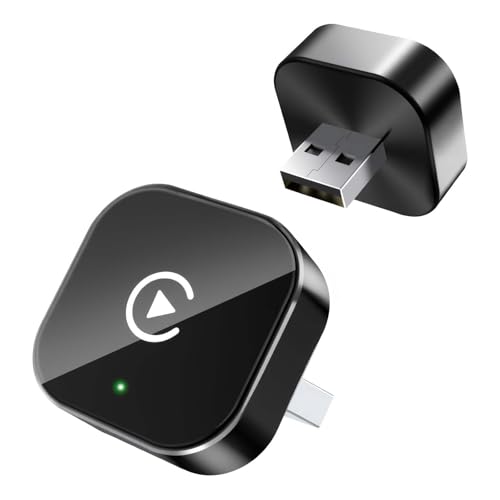
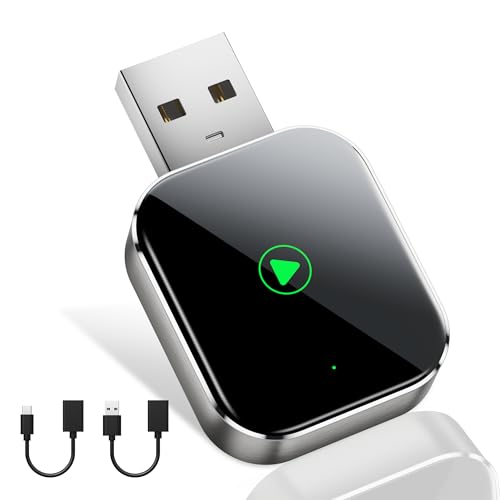
- Use a Wireless CarPlay Adapter/Dongle: This is a fantastic option if your car already has a factory-installed system with wired CarPlay. This small device (a “dongle”) plugs into your car’s USB port and allows your iPhone to connect to CarPlay wirelessly.
- Add a Standalone Portable Display: This is the simplest option. It’s a portable screen that mounts to your dashboard or windshield and connects to your phone. It functions independently of your car’s built-in stereo system.
Choosing Your Upgrade Path: Head Units vs. Adapters vs. Displays
Deciding on the best way to add Apple CarPlay to an older car comes down to balancing cost, features, and installation effort. Each path offers a distinct set of advantages. To help you make an informed choice, it’s crucial to directly compare these CarPlay upgrade options. Consider what you value most: a seamless, factory-like experience, a quick and budget-friendly solution, or something you can move between vehicles.
Pro Tip: Before you decide, think about your biggest priority: seamless integration, budget, or ease of installation? Your answer will point you to the best solution for your specific needs.
Here is a direct comparison to help you determine the right path for your vehicle and your wallet. “Integration” refers to how well the system works with your car’s existing features, like steering wheel controls for volume and calls.
| Method | Best For… | Avg. Cost | Installation Difficulty | Key Features |
|---|---|---|---|---|
| Aftermarket Head Unit | The most complete, factory-like experience. | High | Moderate to High | Full integration, adds a modern touchscreen, potential for backup camera. |
| Wireless CarPlay Adapter | Cars that already have wired CarPlay. | Low | Very Low (Plug-in) | Adds wireless convenience to an existing system, uses the factory screen. |
| Standalone Display | Ultimate simplicity, budget-conscious users, or those with rental/leased cars. | Low to Medium | Very Low (Mount & Plug-in) | Portable, no permanent installation, works in any car with a power outlet. |

Method 1: Installing an Aftermarket Head Unit (The Full Integration)
For the vast majority of drivers looking to add CarPlay to an older car, installing a new aftermarket head unit is the definitive solution. This method provides the most seamless and feature-rich experience, essentially giving your car’s dashboard a complete modern makeover. Leading brands like Pioneer, Kenwood, Sony, Alpine, Clarion, and JVC offer a wide range of head units with CarPlay compatibility.
This process involves physically removing your car’s original stereo and replacing it with a new touchscreen unit. While it’s the most involved method, it’s also the most rewarding. It doesn’t just add CarPlay; it often upgrades your audio quality, adds Bluetooth connectivity if you didn’t have it, and can even serve as a monitor for a new backup camera.
The single most important step before you buy anything is to check for compatibility. Using a trusted resource like Crutchfield.com to enter your car’s specific make, model, and year is essential. They will tell you exactly which head units fit and what accessories you’ll need for a clean installation.
Quick Fact: Many modern aftermarket units can integrate with your car’s existing steering wheel controls and even add a backup camera!
Step 1: Check Compatibility & Gather Your Parts
This initial step is non-negotiable and will save you immense time and frustration. You cannot simply buy any CarPlay head unit and expect it to fit. You need a model that is physically compatible with your car’s dashboard opening and electronically compatible with its wiring.
To successfully install Apple CarPlay in an older car, you must start by verifying which parts will work.
* Use an online fitment guide. The most reputable is Crutchfield.com. By entering your vehicle’s details, their tool will show you a curated list of head units that are confirmed to fit.
* Identify the necessary accessories. The same tool will also tell you exactly which installation parts are required. This is crucial.
You will typically need the following three main components for the installation:
* The Aftermarket Head Unit: The CarPlay stereo itself. Choose one from a reputable brand that fits your budget and feature requirements.
* The Wiring Harness: This is an adapter that connects the new stereo’s wiring to your car’s factory wiring plugs. It prevents you from having to cut or splice any of your vehicle’s original wires.
* The Dash Kit: This is a custom-molded piece of plastic that allows the new, standardized aftermarket stereo to fit perfectly and look clean in your car’s unique dashboard opening.
Pro Tip: Crutchfield often includes detailed, vehicle-specific instructions with your purchase, which can be a lifesaver for first-time installers.
Step 2: The Installation Process (DIY Guide)
Once you have your compatible head unit and all the necessary installation parts, you can begin the physical installation. While it may seem daunting, the process is logical and has been simplified greatly by the use of vehicle-specific wiring harnesses and dash kits. Feeling overwhelmed? Remember, the wiring harness does most of the complicated work for you. No need to cut factory wires!
The installation process generally follows these three core steps:
- Remove the factory stereo. This usually involves carefully prying off surrounding trim panels (using plastic trim removal tools to avoid scratches) and then unscrewing the bolts that hold the factory radio in place. Gently pull it out and disconnect the wiring plugs from the back.
- Connect the new stereo to the wiring harness. Before putting the new stereo in the dash, you’ll connect its wires to the adapter harness you purchased. This is typically done by matching the wire colors and crimping or soldering them together. This harness will then plug directly into your car’s factory connectors.
- Install the dash kit and mount the new stereo. Assemble the dash kit around your new head unit, then slide the entire assembly into the dashboard. Secure it using the original bolt locations, connect the wiring harness and antenna, and then test everything before snapping the dash trim back into place.
Method 2: Add CarPlay Without Replacing the Head Unit (Adapters & Dongles)
Want the magic of CarPlay but love your car’s original dashboard look? This section is for you. For many drivers, the idea of tearing apart the dashboard is a non-starter. Fortunately, there are excellent options to add CarPlay without replacing the head unit, provided your car meets certain criteria. These solutions are less invasive, faster to install, and often more budget-friendly.
If your car is relatively modern (typically 2016 or newer) and came from the factory with a touchscreen and a basic infotainment system that uses a USB port for media, you have powerful options. For example, if your 2017 car has a USB port and a touchscreen but no CarPlay, you can likely add it. These methods focus on using your existing factory screen to display the CarPlay interface.
- Wireless CarPlay Adapters: This is the simplest scenario. If your car already has wired Apple CarPlay, but you’re tired of plugging your phone in every time, this is the solution. These small dongles plug into the USB port that you normally use for CarPlay. You then pair your phone to the dongle via Bluetooth, and it enables a wireless CarPlay connection. Installation takes less than a minute.
- Firmware Updates & Aftermarket Modules: For cars with a factory screen but no CarPlay at all, the path is more complex. First, check with your vehicle’s manufacturer or dealership. Occasionally, a simple firmware update is all that’s needed to enable the feature. More commonly, you’ll need an aftermarket CarPlay integration module. This is a small electronic box that is installed behind your factory stereo and essentially tricks the system into displaying CarPlay on the factory screen.

Understanding Costs: What to Expect for Your CarPlay Upgrade
Addressing the CarPlay installation cost is a critical part of planning your upgrade. The total expense can vary dramatically based on the method you choose, the components you select, and whether you decide to do the work yourself or hire a professional. Understanding these costs upfront will help you set a realistic budget and avoid surprises.
Remember, investing in a CarPlay unit can also add to your car’s resale value, making it a smart upgrade. Here’s a breakdown of what you can generally expect to pay for each option, separating the cost of parts from potential labor.
- Aftermarket Head Unit:
- Parts Cost: Entry-level units from known brands start around two hundred dollars. High-end models with larger screens and more features can exceed one thousand dollars. Don’t forget to budget for the dash kit and wiring harness.
- Labor Cost: Professional installation can add a significant amount, often ranging from one hundred to four hundred dollars, depending on the complexity of your vehicle.
- Wireless CarPlay Adapter:
- Parts Cost: These devices are quite affordable, typically falling in the range of fifty to one hundred and fifty dollars.
- Labor Cost: There is no labor cost, as you simply plug it in yourself.
- Standalone Display Unit:
- Parts Cost: These range widely based on screen size and features, but most quality units are available for less than two hundred dollars.
- Labor Cost: None. You mount it and plug it into a power source.
DIY vs. Professional Installation: The biggest cost variable for a head unit installation is labor. If you are comfortable with basic tools and following instructions, a DIY installation can save you a substantial amount of money. However, if you’re hesitant about removing dashboard panels or working with wiring, paying a professional provides peace of mind and ensures the job is done correctly.
To simplify your upgrade, consider purchasing an all-in-one CarPlay kit that includes the head unit and necessary adapters, which can streamline the process.


FAQs About Adding CarPlay to a Car
Even with a clear plan, questions often come up when you decide to add CarPlay to any car. Here are direct answers to some of the most common queries we see.
Can Apple CarPlay be installed in truly any car?
Almost, but not literally every single one. If your car has a standard-sized radio slot (known as Single-DIN or Double-DIN), you can almost certainly install an aftermarket head unit. For cars with highly integrated or unusually shaped dash electronics, a standalone display is a universal solution that will work in any vehicle with a power outlet.
How can I add CarPlay to my car that doesn’t have a screen?
The best and most common solution is to install an aftermarket Double-DIN head unit. This replaces your non-screen factory radio with a new unit that has a large, modern touchscreen. This is the core purpose of a head unit upgrade—to add a screen and modern functionality where none existed before.
Will adding an aftermarket CarPlay system void my car’s warranty?
In general, no. Consumer protection laws in many countries prevent a manufacturer from voiding your entire vehicle warranty just because you installed an aftermarket part. However, if the aftermarket part or its improper installation directly causes a failure, the repair for that specific failure may not be covered. Using a proper wiring harness is key to preventing electrical issues.
Can I get wireless CarPlay in an older car?
Yes! The easiest way is to choose an aftermarket head unit that has wireless CarPlay built-in. While these units are often more expensive than their wired-only counterparts, they provide the ultimate convenience. Alternatively, if you install a wired CarPlay head unit, you can then add a wireless adapter to it.
Is it difficult to install a CarPlay head unit myself?
The difficulty varies greatly depending on the car. For many vehicles, it’s a straightforward process that a handy beginner can complete in an afternoon with basic tools. For others, especially luxury cars with complex electronics, it can be very challenging. Using a resource like Crutchfield to get vehicle-specific instructions is the best way to gauge the difficulty for your car.
Can I add a backup camera at the same time I add CarPlay?
Absolutely, and this is one of the best parts of the upgrade. Nearly all aftermarket CarPlay head units have a video input specifically for a backup camera. It’s the perfect time to run the wiring for a new camera while the dashboard is already disassembled, giving you two major safety and convenience upgrades at once.
What’s the difference between Apple CarPlay and my car’s built-in system?
Apple CarPlay is not an operating system itself; it’s an interface that runs on your stereo. It projects a simplified, driver-friendly version of your iPhone’s apps (like Maps, Music, Messages) onto the car’s screen. This means it’s always up-to-date with your phone, whereas a car’s built-in navigation and apps can become outdated quickly.
Final Summary: Revolutionize Your Ride with CarPlay
Upgrading your vehicle with Apple CarPlay is more than just a tech enhancement; it’s a fundamental improvement to your daily driving experience. It makes navigation intuitive, music access seamless, and communication safer. As we’ve covered, learning how to add CarPlay to any car is an achievable goal for nearly every driver, thanks to the variety of excellent solutions available on the market today.
Whether you choose the fully integrated path of an aftermarket head unit, the simple convenience of a wireless adapter, or the ultimate flexibility of a standalone display, a modern, connected drive is within reach. The key to a successful upgrade is careful planning, starting with a thorough compatibility check and a clear understanding of your budget and desired features.
- ✅ The Best Method is a Head Unit: For a seamless, factory-like experience, replacing your factory stereo with a CarPlay-compatible head unit is the top choice.
- ✅ Compatibility is Crucial: Always use a tool like Crutchfield to confirm which products fit your specific car before you purchase anything.
- ✅ Simpler Options Exist: If a full installation isn’t for you, wireless adapters and standalone displays offer fantastic, easy-to-install alternatives.
Your modern, connected driving experience is just one upgrade away. Use this guide to choose your path and enjoy the ride
Last update on 2026-03-07 / Affiliate links / Images from Amazon Product Advertising API


![Is Remote Start Bad For Your Car Truth & Myths Debunked [year]](https://i0.wp.com/carxplorer.com/wp-content/uploads/2026/03/Is-Remote-Start-Bad-For-Your-Car-Truth-Myths-Debunked-year-2.jpg?resize=60%2C60&ssl=1 "Is Remote Start Bad For Your Car Truth & Myths Debunked [year] 17")
![Mercedes Car: Is It a Good Buy? The Complete Guide [year]](https://i0.wp.com/carxplorer.com/wp-content/uploads/2026/03/Mercedes-Car-Is-It-a-Good-Buy-The-Complete-Guide-year-2.jpg?resize=60%2C60&ssl=1 "Mercedes Car: Is It a Good Buy? The Complete Guide [year] 19")