
Wondering if leaving a USB plugged in your car drains the battery? You’re not alone. Many drivers worry that forgetting a phone charger or a dash cam cable could lead to a dead battery and a major inconvenience. This concern is valid, especially with modern cars full of electronics.
Generally, leaving a USB device plugged into your car will not drain the battery. Most modern cars built in 2026 have “switched” USB ports that power down when the ignition is off. However, if your car has an “always-on” port, a connected device will draw a small amount of power (parasitic drain) and could drain the battery over an extended period.
Based on automotive electrician advice and electrical engineering principles, the answer isn’t a simple yes or no. This guide breaks down exactly when it’s safe and when it’s a risk. You’ll discover how to identify your car’s specific setup and prevent battery drain for good.
Key Facts
- Switched Ports Are Standard: The majority of modern cars use ignition-controlled USB ports that turn off with the engine, posing no risk of battery drain.
- Parasitic Drain is Minimal: A typical idle USB charger draws only 1 to 10 milliamps (mA), an amount so small it would take months to drain a healthy battery.
- Acceptable Drain Threshold: Automotive experts consider a total parasitic draw of under 50 milliamps normal for a vehicle at rest, covering the clock, alarm, and other essential electronics.
- Faulty Chargers Are a Risk: A cheap or damaged USB charger can malfunction and draw significantly more power, creating a legitimate risk of draining your battery.
- Cold Weather Amplifies the Problem: A battery’s starting power can drop by over 50% in freezing temperatures, making even a small parasitic drain potentially problematic.
Does Leaving a USB Plugged In Your Car Drain the Battery?
The answer is, it depends entirely on your car’s electrical system. For most modern vehicles, leaving a USB device plugged in is perfectly safe and will not drain your battery. This is because their power outlets are “switched,” meaning they are connected to the ignition. When you turn off the car, the circuit is broken, and power to the USB port is cut completely. This design specifically prevents accessories from causing a parasitic power drain.

However, some vehicles, particularly older models or certain trucks and utility vehicles, feature “always-on” power outlets. These are wired directly to the car’s 12v battery (with a fuse in between). An always-on USB port will continue to supply a small amount of voltage even when the engine is not running. If a device is left plugged into one of these ports, it will create a continuous, small electrical load that can, over time, drain the battery.
The key takeaway is that the USB device itself is rarely the problem; it’s all about whether the port it’s plugged into stays powered. Understanding this difference is the first step to knowing if you need to be concerned. Later, we’ll explore how to determine which type of port your vehicle has.
What Is Parasitic Battery Drain and How Much Power Does a USB Use?
Parasitic battery drain is the continuous power consumption by a vehicle’s electronic components after the ignition is turned off. A healthy, modern car naturally has a small parasitic draw, typically between 20-50 milliamps (mA), to power things like the clock, security alarm, and onboard computers. Think of it as a tiny, slow drip from a faucet—a normal and expected function.
A USB device left in an always-on port adds to this baseline drain. The amount of power it uses when not actively charging anything is called its “quiescent current.” For most quality USB chargers, this draw is incredibly small.
Here’s a breakdown of what to expect:
- USB Cable Only: A simple cable with no charger attached has no electronic components and draws 0mA. It cannot drain your battery.
- Idle Charger (No LED): A basic charger with no indicator light will still have a tiny quiescent current, usually around 1-2mA.
- Idle Charger (With LED): The small LED indicator light itself adds a minimal load. The total draw is typically 1-3mA. This is negligible.
- Device in Standby (e.g., Dash Cam): This is where the risk increases. A device like a dash cam in “parking mode” is actively using power and can draw 150-300mA or more.
Expert Note: An automotive electrician will tell you that any parasitic draw under 50mA is generally considered normal for a modern car. The challenge isn’t a single device with a 2mA draw, but the cumulative effect of multiple accessories creating a “death by a thousand cuts.” A 10mA draw from a charger would take months to drain a healthy 50 Amp-hour battery on its own.
How Can You Tell if a Car’s USB Port Stays On?
The easiest way to check if your USB port stays on is to use a charger with an LED indicator light. Plug it in, turn off the car, remove the key, and lock the door. If the LED light on the charger turns off immediately or within a few minutes, the port is “switched.” If the light remains lit indefinitely, the port is “always-on” and can drain your battery.
Here is a simple, 60-second test you can perform right now:
- Find a USB charger with an indicator light. A phone charger is perfect for this.
- Plug it into the USB port or 12V socket you want to test.
- Turn your car on, then turn it off completely.
- Remove the key from the ignition.
- Open and close the driver’s door. This signals to many modern cars that the driver has left, prompting them to shut down accessory power.
- Observe the LED light. If it turns off, you have a switched port. If it stays on for more than 5-10 minutes, you have an always-on port.
It’s important to check all outlets, as many vehicles have a mix of both types. The table below outlines the key differences.
| Feature | Switched Outlet | Always-On Outlet |
|---|---|---|
| Power Status (Car Off) | No power | Continuous power |
| Battery Drain Risk | None | Low to High (depending on device) |
| Common Location | Dashboard, front console | Center console, cargo area, trunk |
| Primary Use Case | Charging while driving | Powering devices when parked (e.g., coolers, dash cams) |
If you don’t have a charger with a light, you can also plug your phone in to charge for a moment, then turn the car off. If your phone continues to indicate it’s charging, the port is always-on.
How Can You Test For and Prevent USB-Related Battery Drain?
To prevent battery drain, the easiest method is to simply unplug all USB devices when you turn off your car. If you have an always-on device like a dash cam, use a dedicated hardwire kit with a low-voltage cut-off feature. For long-term parking, connecting a battery tender is the best way to keep the battery optimally charged.
⚠️ Safety Warning: Working with car batteries can be dangerous. Always wear safety glasses and gloves. If you are not comfortable with this procedure, consult a professional mechanic. Never touch the multimeter leads to the positive and negative terminals at the same time.
If you suspect you have an abnormal power draw, you can test for it yourself using a digital multimeter. This process measures the total parasitic draw of your entire vehicle.
Here’s a simplified guide to performing a parasitic draw test:
- Prepare the Vehicle: Turn the car off, remove the key, close all doors, and ensure all accessories (lights, radio) are off. Wait for 15-30 minutes for the car’s electronic modules to enter “sleep mode.”
- Set the Multimeter: Set your digital multimeter to its highest Amperage setting, usually 10A DC. Plug the red probe into the 10A socket.
- Disconnect the Battery: Loosen the nut on the negative (-) battery terminal and disconnect the cable from the battery post.
- Connect the Multimeter: Connect the multimeter “in series.” This means attaching the red probe of the multimeter to the disconnected negative battery cable and the black probe to the negative (-) battery post itself. The multimeter is now bridging the gap, and all power flows through it.
- Read the Draw: The multimeter will display the total parasitic draw in amps. A reading of “0.03” means 30 milliamps (mA), which is a healthy reading. A reading of “0.30” means 300mA, indicating a significant problem.
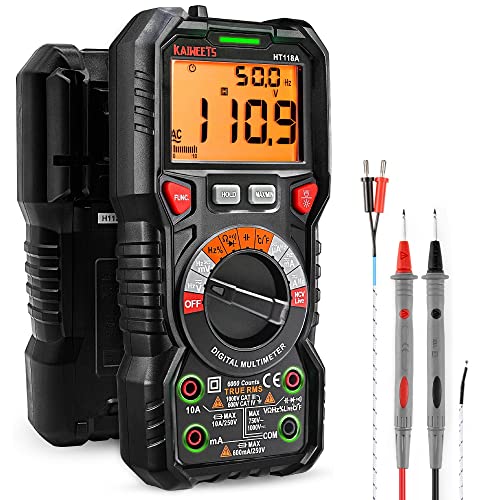
If you find a high draw, you can start pulling fuses one by one from the fuse box. When the reading on the multimeter drops significantly, you have identified the circuit causing the drain. This process helps you isolate whether the problem is your USB port or another component entirely.
FAQs About does leaving usb plugged in car drain battery
Does the little LED light on my USB charger drain the battery?
Yes, the LED light does draw power, but the amount is extremely small and will not drain a healthy car battery. A typical LED might draw 1-3 milliamps (mA). It would take many months for such a tiny draw to have a noticeable effect on your car’s ability to start. The main concern should be the charger’s internal circuitry, not its indicator light.
Can a faulty USB charger drain my battery faster?
Absolutely. A faulty or poorly made USB charger can cause a significant parasitic drain. Internal short circuits or inefficient voltage converters can cause the charger to draw much more power than normal, even with nothing plugged into it. If you suspect a charger is draining your battery, unplug it immediately.
Is it ok to leave my phone charging in the car overnight?
This is not recommended if your port is always-on. While a single overnight charge won’t likely kill a healthy battery, doing it repeatedly can shorten the battery’s overall lifespan by discharging and recharging it unnecessarily. If the port is switched and turns off with the car, there is no risk.
Will leaving just the USB cable plugged in (with no charger) drain the battery?
No, a simple USB cable by itself cannot drain the battery. A cable is just a set of wires; it has no electronic components to consume power. The power draw comes from the USB charger (the part that plugs into the 12V socket) or the car’s built-in USB port electronics.
Do modern cars automatically cut power to USB ports?
Yes, most modern cars are designed to cut power to accessory outlets after a set period. This “retained accessory power” feature often keeps the ports active for a few minutes after the engine is off or until a door is opened. This is a specific design choice to prevent the exact problem of battery drain from forgotten accessories.
Is there a difference between the built-in USB port and a cigarette lighter adapter?
Yes, there can be a significant difference. Built-in USB ports are often part of the car’s infotainment system and are more likely to be ignition-switched. Aftermarket cigarette lighter adapters’ behavior depends entirely on whether the 12V socket itself is switched or always-on, which varies widely between vehicle models.
Can a USB hub drain the car battery?
Yes, a USB hub, especially a powered one, will contribute to parasitic drain if left in an always-on socket. Each port and the hub’s own electronics have a quiescent current. While still small, a multi-port hub will draw more idle power than a single charger, so it’s more important to unplug them.
What about a dash cam plugged into a USB port?
A dash cam is one of the most common causes of USB-related battery drain. When in “parking mode,” a dash cam is actively monitoring and recording, causing a much higher power draw (150-300mA or more) than an idle charger. These devices should always be connected via a special hardwire kit that has a built-in low-voltage cutoff to protect the battery.
Does cold weather make the battery drain from a USB worse?
Cold weather doesn’t increase the drain from the USB, but it dramatically reduces your battery’s ability to start the car. A car battery can lose over 50% of its effective starting power in freezing temperatures. A small parasitic drain that would be harmless in the summer might be enough to prevent the car from starting in the winter.
How long can I leave a USB device plugged in before the battery dies?
It depends entirely on the device’s draw and the battery’s health, but for a typical idle charger (5mA draw) on a healthy car battery (50Ah capacity), it would theoretically take months to drain it. The real-world time is much shorter due to battery self-discharge and other parasitic loads. A device like a dash cam could drain it in just a few days.
Final Thoughts
Understanding the relationship between your USB devices and your car’s battery empowers you to avoid the headache of a dead battery. The key is to remember that the risk is almost never about the USB device itself, but about the type of power port it’s connected to.
Here are the most critical points to remember:
- Switched vs. Always-On is Key: The biggest factor is your car’s wiring. If the USB port turns off with the ignition (“switched”), there is zero risk. If it stays on (“always-on”), a small drain will occur.
- Idle Drain is Usually Negligible: A quality USB charger left plugged in draws a tiny amount of power (1-10mA), which is not enough to drain a healthy battery over short periods.
- The Device Matters More Than the Charger: An idle charger is low-risk. A device left charging, or a dash cam in parking mode, will draw significantly more power and can drain a battery in days if the port is always-on.
- Test Your Own Ports: The only way to be certain is to test. Use a charger with an LED light: if it stays on more than a few minutes after the car is off and doors are closed, the port is always-on.
- Faulty Chargers Are a Real Risk: A cheap, poorly made, or damaged USB charger can short circuit internally and create a significant parasitic drain, killing your battery unexpectedly.
By taking a moment to test your ports and developing the simple habit of unplugging devices from always-on sockets, you can enjoy the convenience of your electronics without the worry. For most drivers in 2026, leaving a charger plugged in is one less thing you need to worry about.
Last update on 2026-02-23 / Affiliate links / Images from Amazon Product Advertising API


![How Old To Rent A Car Iceland All Age Rules Explained For [year]](https://i0.wp.com/carxplorer.com/wp-content/uploads/2026/02/How-Old-To-Rent-A-Car-Iceland-All-Age-Rules-Explained-For-year-2.jpg?resize=60%2C60&ssl=1 "How Old To Rent A Car Iceland All Age Rules Explained For [year] 8")

